02. Image Editing (Image Editing)
What is Image Editing?
Section titled “What is Image Editing?”If image generation is the task of “creating something from nothing,” then Image Editing is the task of “modifying an existing image in a desired direction.”
AI-based image editing can automatically perform complex modifications using only text prompts or masks.
The main editing types supported in ComfyUI are as follows:
| Editing Type | Representative Use Cases |
|---|---|
| Inpainting | Removing unwanted objects, face correction, outfit replacement |
| Outpainting | Background expansion |
| Relighting | Day-to-night conversion, changing lighting direction |
| Context-aware Editing | Character style transfer, product mockups |
| Instruction-based Editing | Simple object replacement and modification |
Detailed Explanation by Editing Type
Section titled “Detailed Explanation by Editing Type”2.1 Inpainting
Section titled “2.1 Inpainting”Inpainting is a technique where you designate a specific area of an image with a Mask, and only that area is filled with new content. A mask is like an instruction saying “please redraw this part.”
How It Works
Section titled “How It Works”Original image + Mask (area to edit) + Text-> Only the masked area is regenerated-> The rest of the image is preservedRepresentative Workflow: Flux.1 Fill Inpainting
Section titled “Representative Workflow: Flux.1 Fill Inpainting”This is an inpainting workflow using the Flux.1 Fill Dev model.
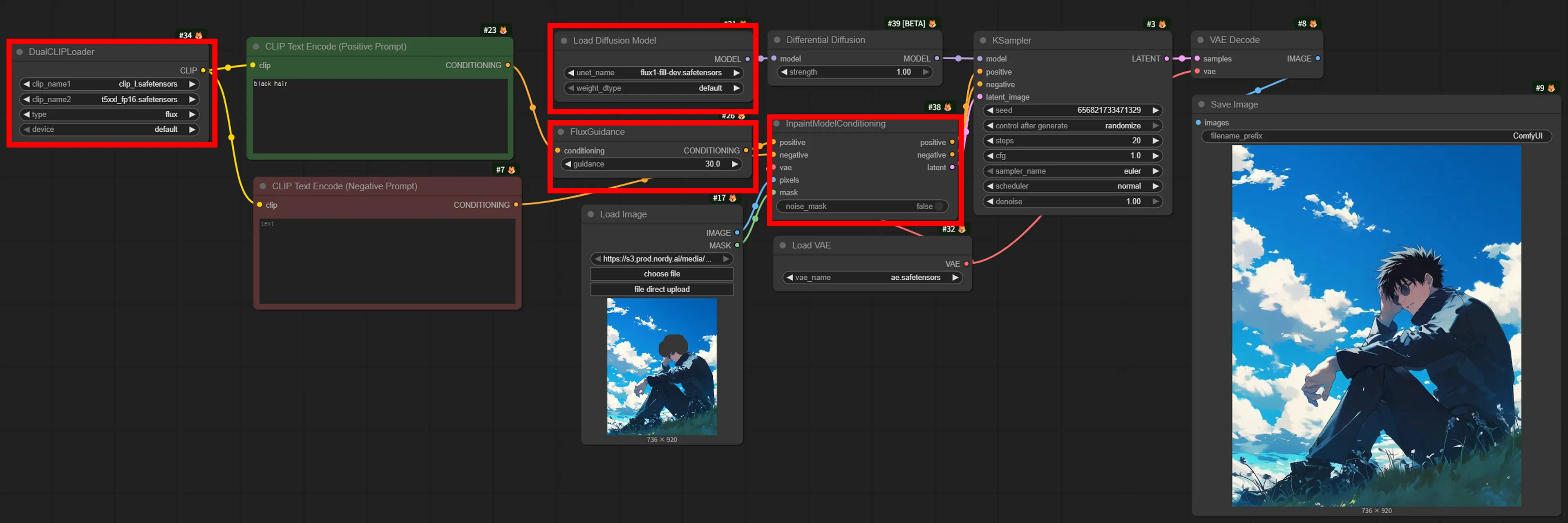
Key Components:
| Node | Role |
|---|---|
| DualCLIPLoader | Loads two text encoders, clip_l and t5xxl, with the “flux” type |
| Load Diffusion Model | Loads the flux1-fill-dev.safetensors model |
| FluxGuidance | Sets prompt adherence strength (default value 30) |
| InpaintModelConditioning | Passes the original image and mask to the model |
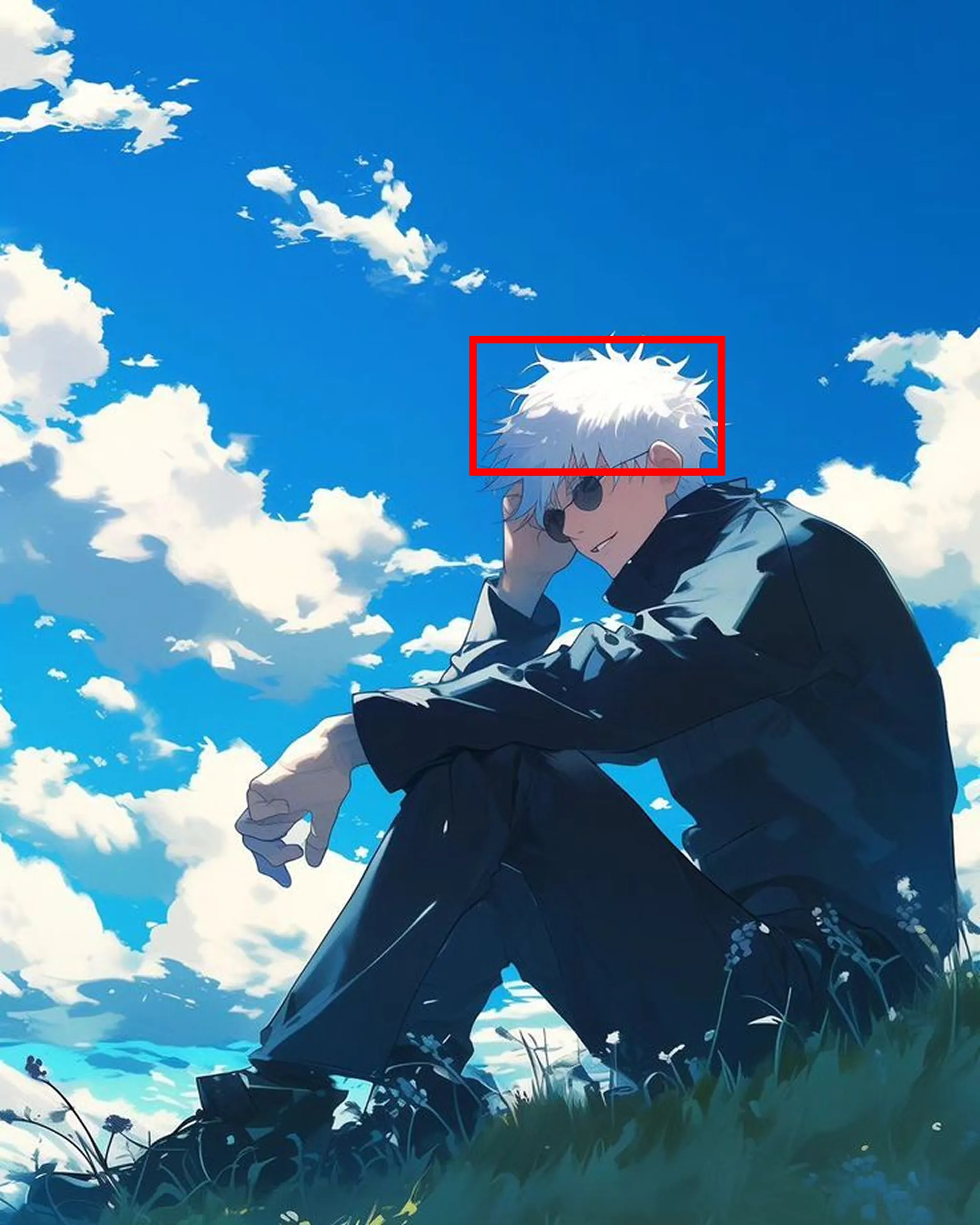
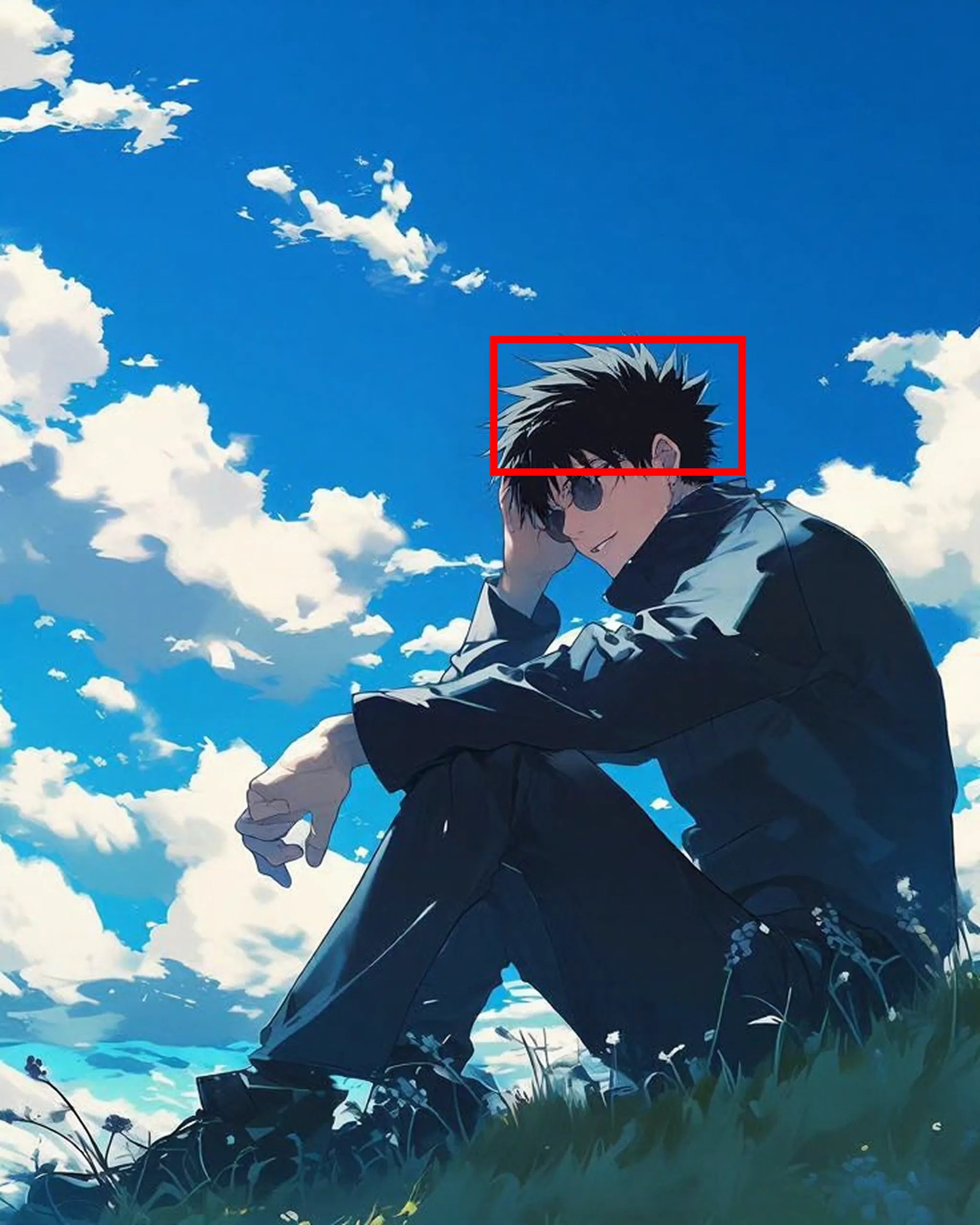
2.2 Outpainting
Section titled “2.2 Outpainting”Outpainting is a technique that extends the canvas beyond the image boundaries to generate new content. It naturally fills surrounding areas while maintaining the style and content of the original image.
How It Works
Section titled “How It Works”Original image-> ImagePadForOutpaint (how much to extend in each direction)-> Generate a mask for the extended area-> Generate the extended area based on textRepresentative Workflow: Flux.1 Outpainting
Section titled “Representative Workflow: Flux.1 Outpainting”This uses the same flux1-fill-dev.safetensors model as inpainting, but with additional padding and blending nodes.
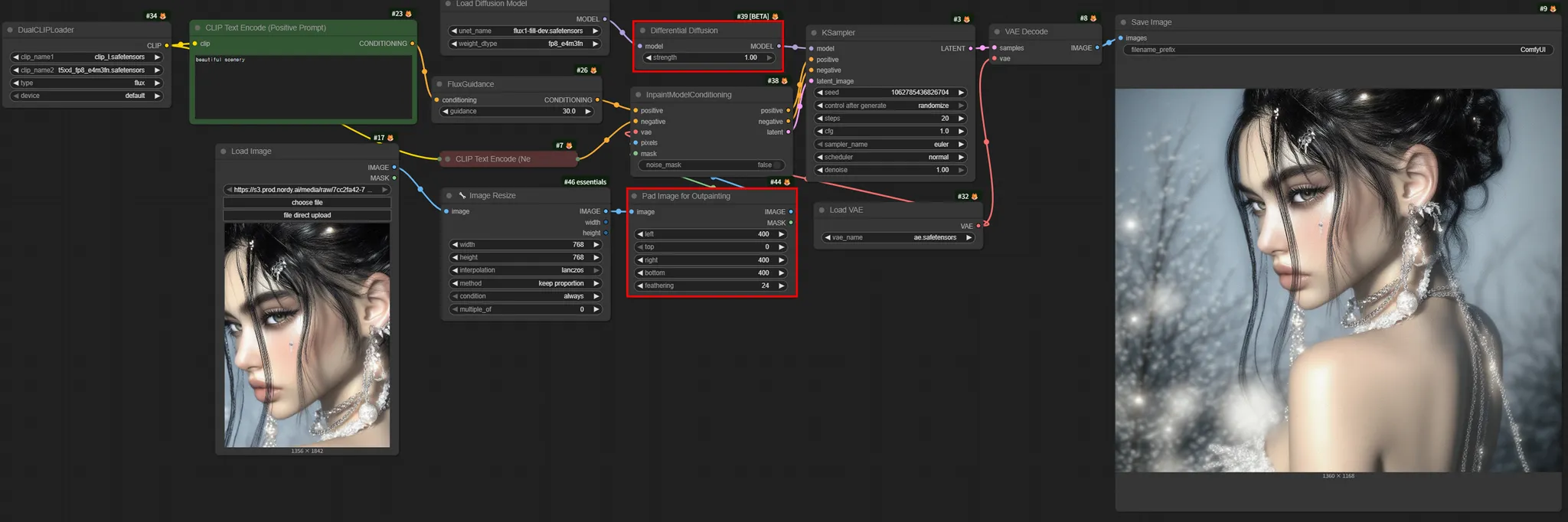
Key Nodes:
| Node | Role |
|---|---|
| ImagePadForOutpaint | Sets padding size and feathering for each direction. Extension pixels can be specified individually per direction |
| DifferentialDiffusion | Smoothly blends the boundary between the original and extended areas |
2.3 Relighting
Section titled “2.3 Relighting”Relighting is a technique for changing the lighting of an image. You can control the lighting direction and intensity via text, such as changing from daytime to nighttime, or switching from side lighting to backlighting.
Representative Workflow: Qwen Image Relight
Section titled “Representative Workflow: Qwen Image Relight”This workflow applies a Relight LoRA to the Qwen Edit 2509 model.
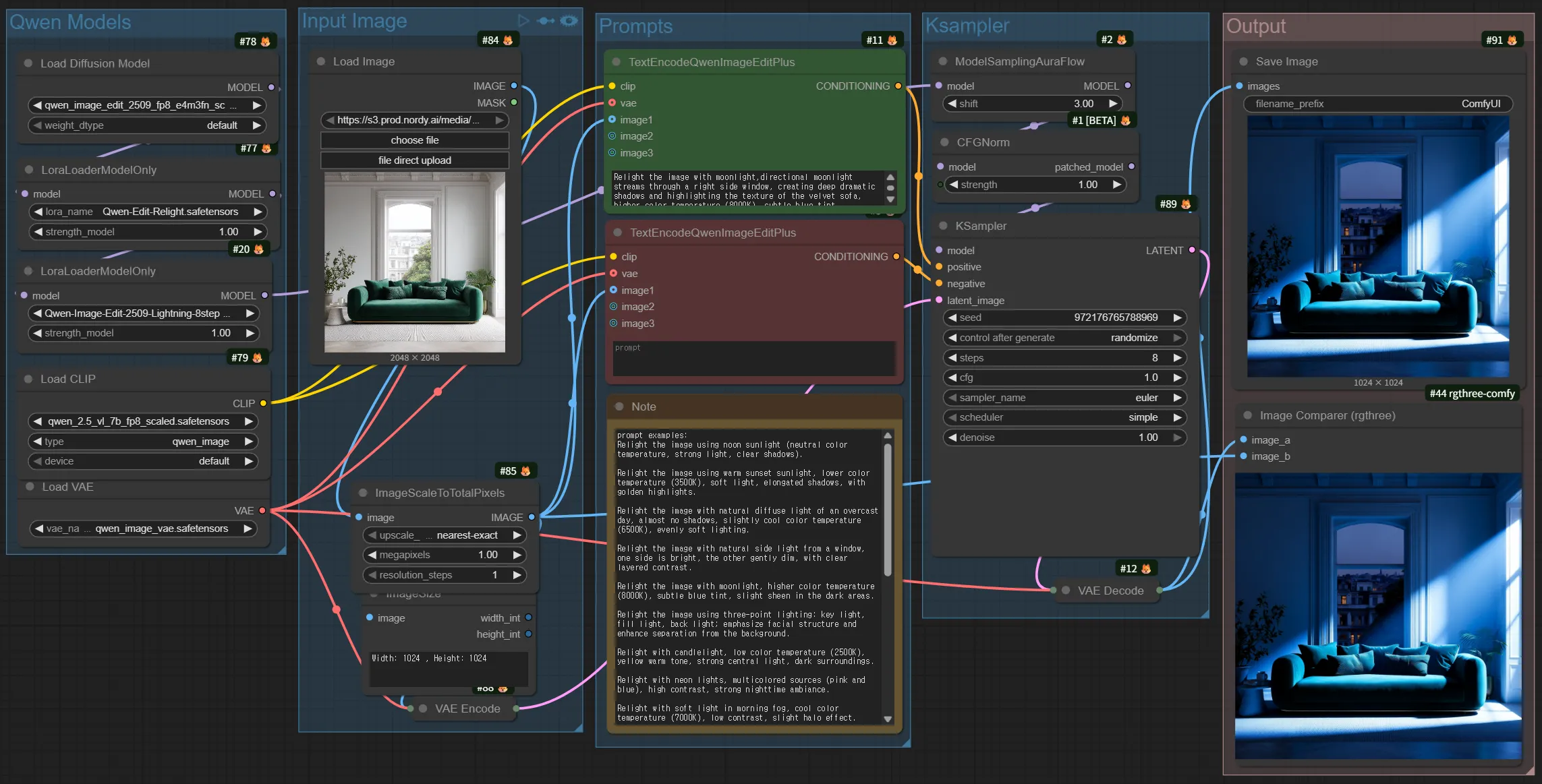
Key Components:
| Item | Details |
|---|---|
| Model | qwen_image_edit_2509_fp8_e4m3fn.safetensors |
| LoRA | Lightning 4-step LoRA + Relight LoRA |
| Trigger Word | Chinese trigger word “重新照明,” (meaning “relight”) |
| Prompt Format | ”重新照明,” + desired lighting description (in English) |
2.4 Text-based Editing
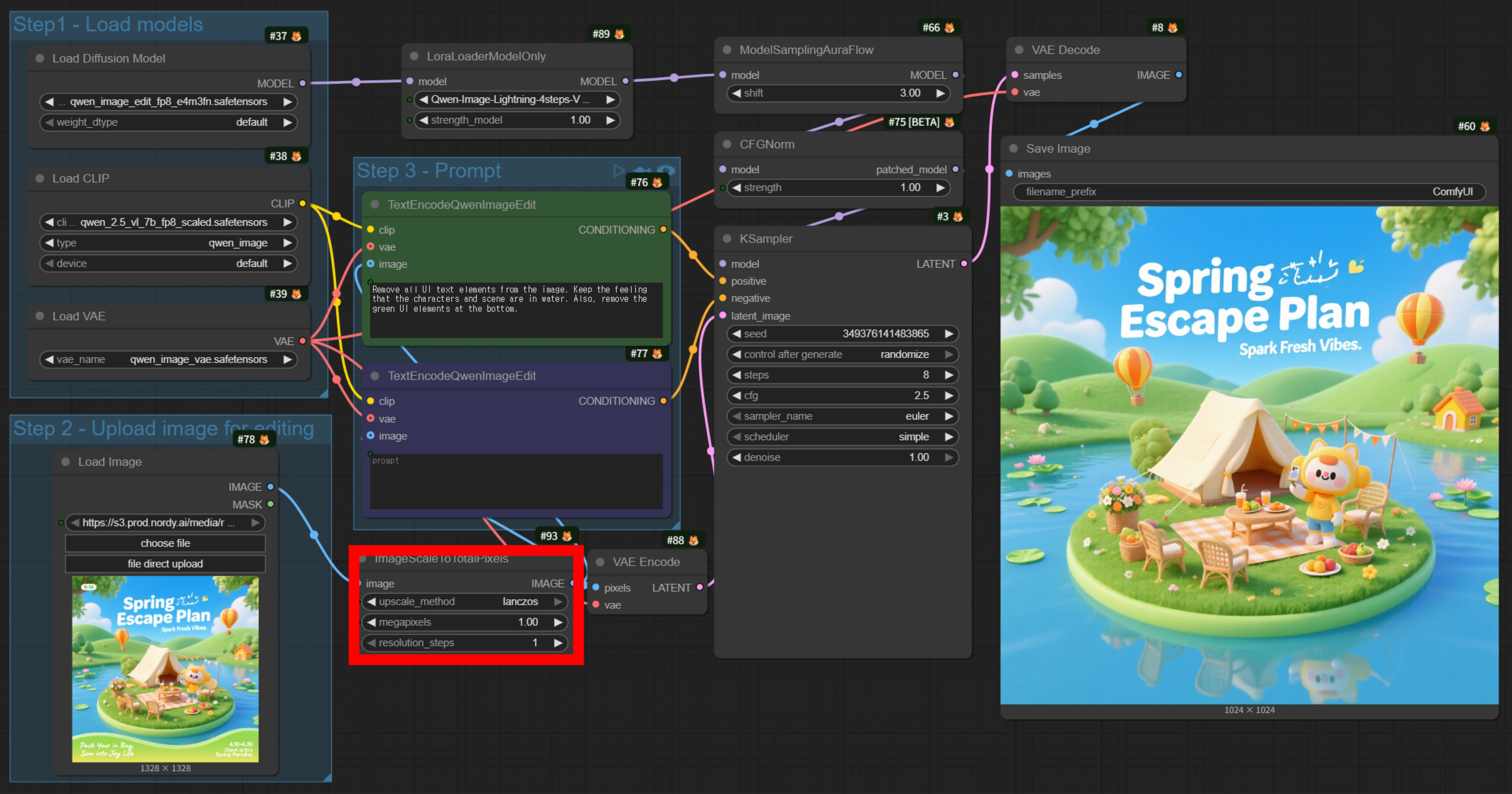
Section titled “2.4 Text-based Editing”Instruction-based Editing is a method of modifying images using only text, without masks. It uses intuitive commands such as “remove the text.”
Representative Workflow: Qwen Image Edit
Section titled “Representative Workflow: Qwen Image Edit”This is the most versatile instruction-based editing workflow.
- Example prompt: “Remove all UI text elements”
2.5 Context-aware Editing
Section titled “2.5 Context-aware Editing”Context-aware Editing is a technique for changing the style, background, attributes, and more of a character or object while preserving its appearance. Unlike regular editing, it “remembers” the key features of the input image to ensure consistency.
Representative Workflow: Flux Kontext Dev
Section titled “Representative Workflow: Flux Kontext Dev”The Flux.1 Kontext Dev model is an editing model specialized in character consistency.
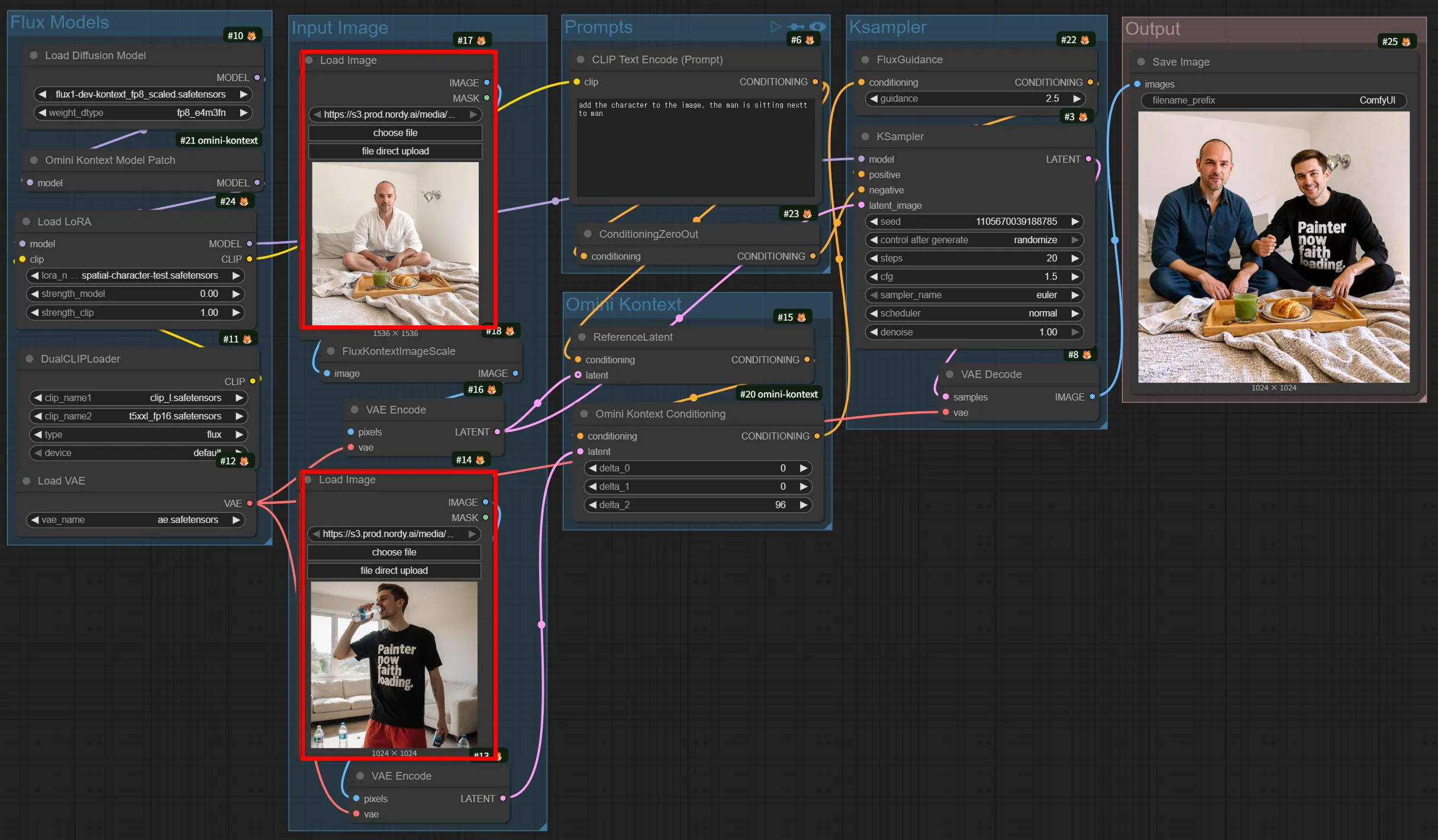
Key Features:
- Can accept 1-2 reference images as input
- Character consistency: Transform the same character into different poses/backgrounds
- Style Transfer: Change the artistic style of an image
- Text editing: Modify text within an image
- Object modification: Change attributes of specific objects
Workflow Comparison Table
Section titled “Workflow Comparison Table”| Workflow | Editing Type | Model | Input | Features |
|---|---|---|---|---|
| Flux.1 Fill Inpaint | Inpainting | Flux.1 Fill Dev | Image+Mask+Text | Text-based fill of masked area |
| Flux.1 Outpaint | Outpainting | Flux.1 Fill Dev | Image+Text | Canvas extension, padding/feathering settings |
| Qwen Relight | Relighting | Qwen Edit 2509 | Image+Text | Lighting change, trigger word required |
| Qwen Image Edit | General Edit | Qwen Image Edit | Image+Text | General-purpose editing, turbo mode |
| Flux Kontext | Context Edit | Flux.1 Kontext | Image (1-2)+Text | Character consistency, style transfer |