03. Guided Generation
What is Guided Generation?
Section titled “What is Guided Generation?”Basic Text-to-Image generation creates images from prompts alone. However, when you need structural control like “in this pose,” “with this composition,” or “in this style,” prompts alone have their limitations.
Guided Generation is a technique that controls the generation output by injecting additional conditions into the model, such as reference images, structural information, and style weights. In ComfyUI, there are three main approaches:
| Approach | Control Target | Representative Node |
|---|---|---|
| ControlNet | Spatial structure, layout | ControlNetApplyAdvanced |
| LoRA | Style, character, concept | LoraLoader |
| Reference/Redux | Overall style, mood | Model-specific dedicated nodes |
Detailed Guide Types
Section titled “Detailed Guide Types”ControlNet
Section titled “ControlNet”ControlNet controls the structure of generated images by injecting structural conditions extracted from an input image into the model. It can generate entirely different images while preserving the contours, depth, and human poses from the original image.
ControlNet Types
Section titled “ControlNet Types”| Type | Extracted Information | Use Case | Preprocessing Node |
|---|---|---|---|
| Canny | Edge lines | Maintaining shape/silhouette | Canny |
| Depth | Depth map | Maintaining perspective/spatial arrangement | DepthAnything V2 |
| OpenPose | Body joint positions | Maintaining pose | DWPosePreprocessor |
ControlNet Key Parameters
Section titled “ControlNet Key Parameters”| Parameter | Description | Recommended Range |
|---|---|---|
| strength | Control intensity. Higher values follow the structure more strictly | 0.5 ~ 1.0 |
LoRA - Style/Character Customization
Section titled “LoRA - Style/Character Customization”LoRA is a model trained on specific styles, characters, and more.
LoRA Key Parameters
Section titled “LoRA Key Parameters”| Parameter | Description | Recommended Range |
|---|---|---|
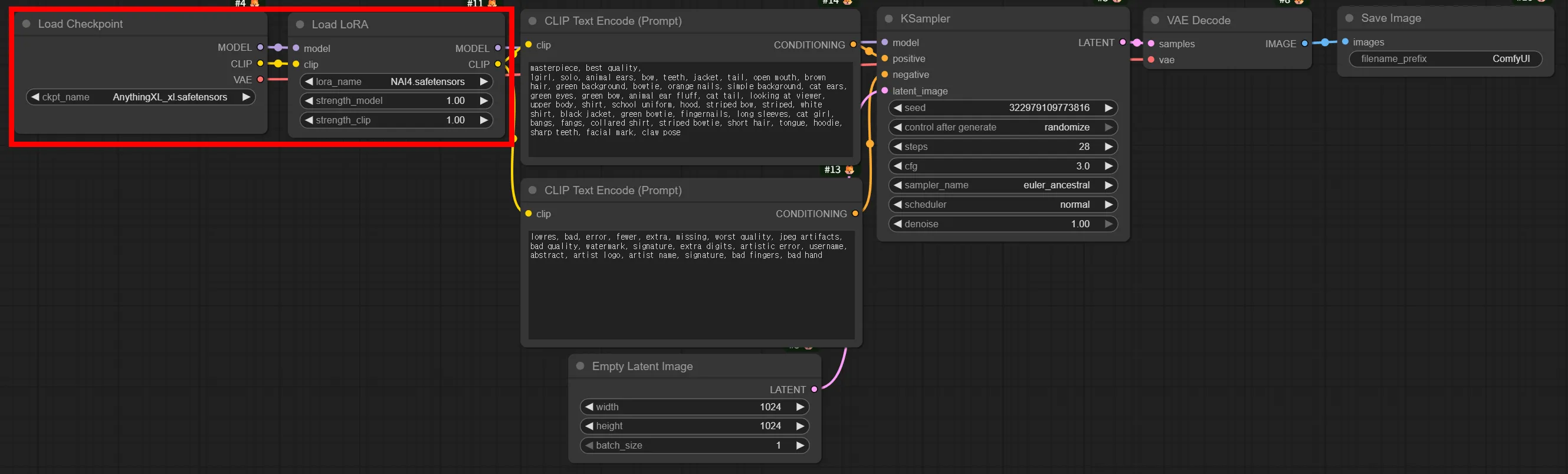
| strength_model | LoRA influence on the model | 0.6 ~ 1.0 |
| strength_clip | LoRA influence on the text encoder | 0.6 ~ 1.0 |
Reference/Redux - Style Transfer Based on Reference Images
Section titled “Reference/Redux - Style Transfer Based on Reference Images”The Reference approach transfers style, color palette, and mood by feeding the reference image itself into the model. While ControlNet is a command to “follow this shape,” Reference is a command to “create with this feel.”
Dedicated models like Flux.1 Redux extract visual characteristics from the reference image and apply them to new image generation.
ControlNet Workflows
Section titled “ControlNet Workflows”Canny Workflow
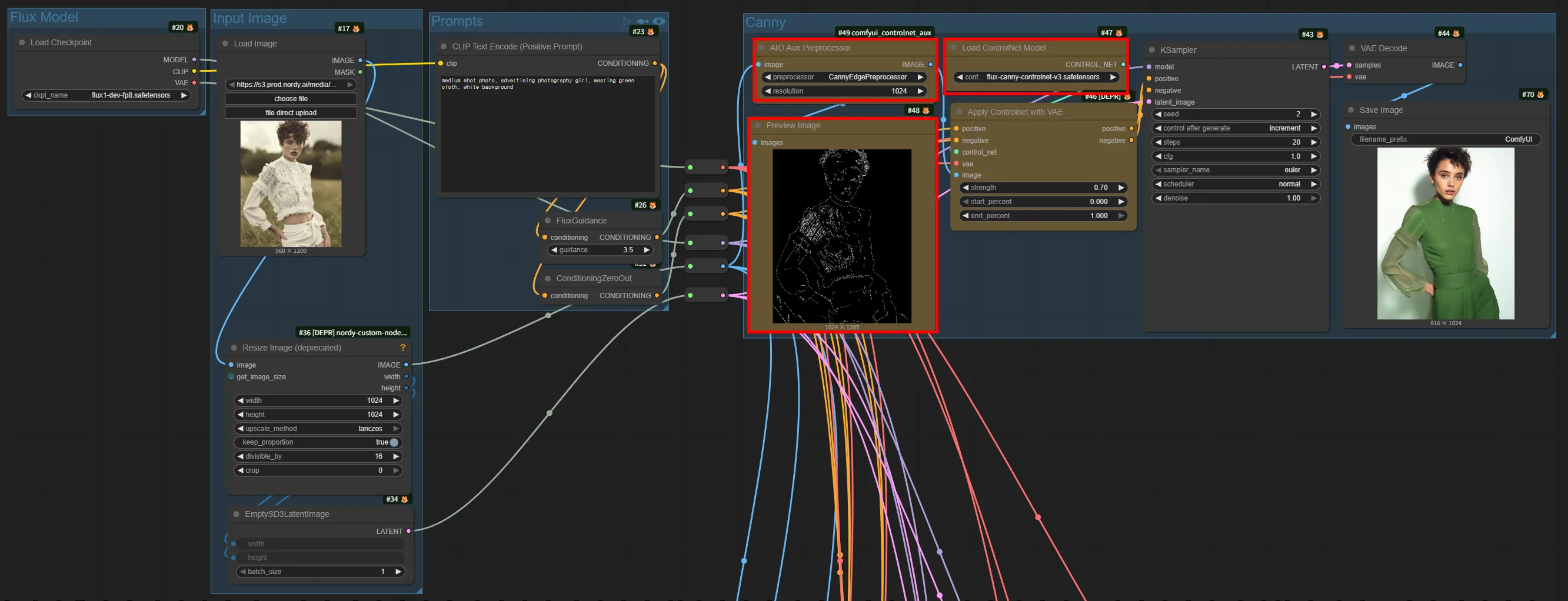
Section titled “Canny Workflow”Canny ControlNet is the most basic and intuitive ControlNet type. It extracts edge lines from the input image to control the shape of the generated image.
Flux.1 Canny
Section titled “Flux.1 Canny”Model used: flux1-dev-fp8 + flux-canny-controlnet-v3.safetensors
Depth Workflow
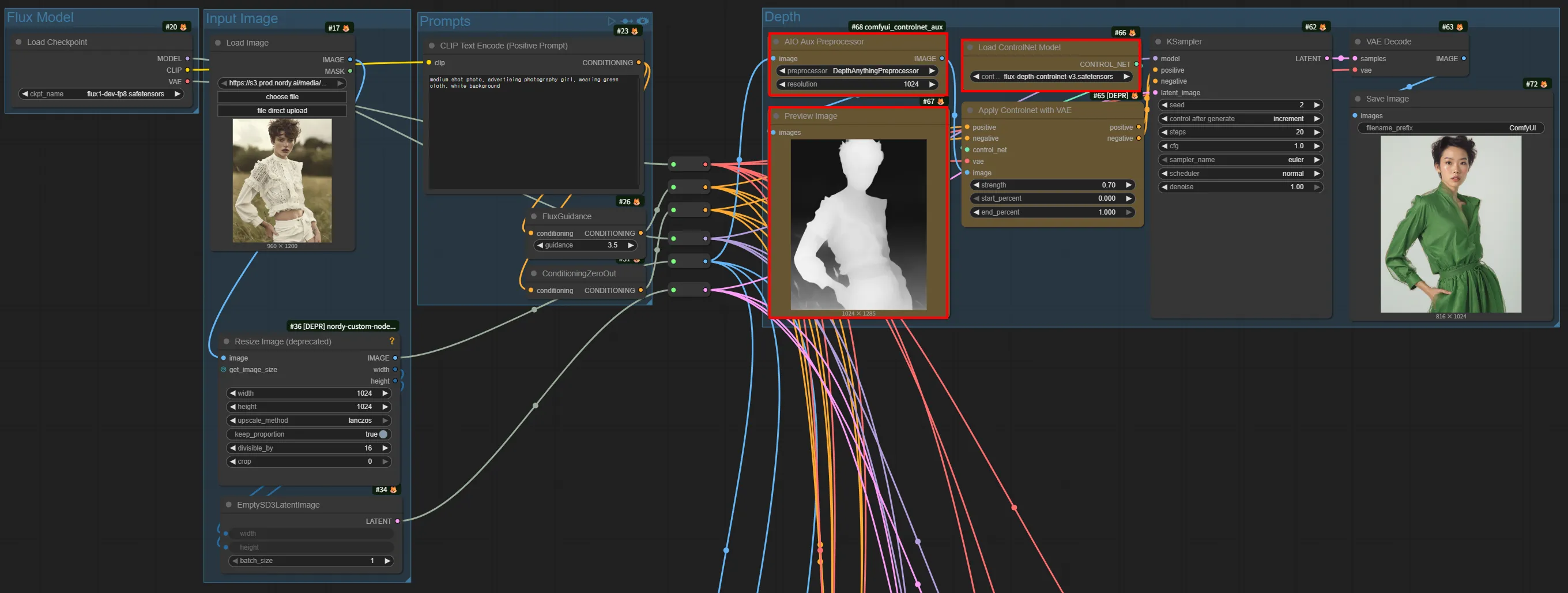
Section titled “Depth Workflow”Depth ControlNet extracts the depth map from the input image to control perspective and spatial arrangement. Rather than preserving the shape of subjects, it is effective at maintaining “what is in front and what is behind.”
Flux.1 Depth
Section titled “Flux.1 Depth”Model used: flux1-dev-fp8 + flux-depth-controlnet-v3.safetensors
OpenPose Workflow
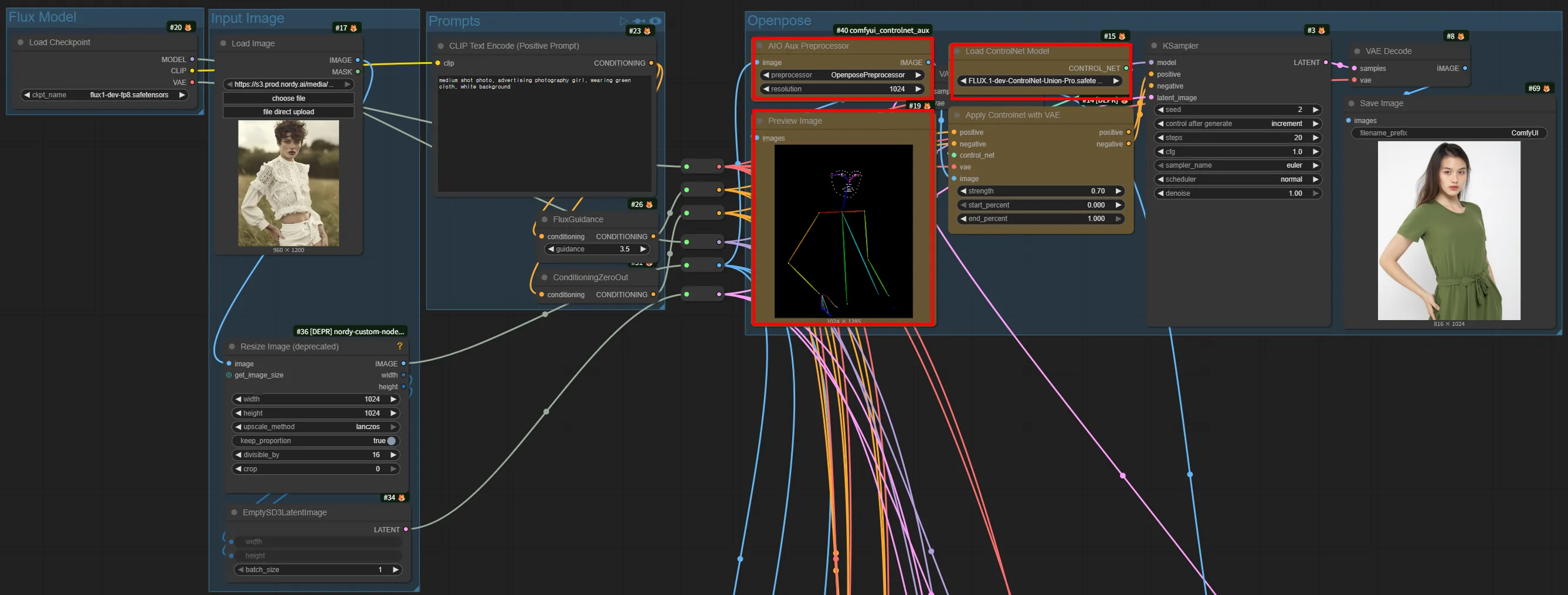
Section titled “OpenPose Workflow”OpenPose ControlNet extracts the pose of people in the input image, making it effective for generating different characters in the same pose.
Flux.1 OpenPose
Section titled “Flux.1 OpenPose”Model used: flux1-dev-fp8 + FLUX-1-dev-Controlnet-union-Pro.safetensors
LoRA Workflow Basic Structure
Section titled “LoRA Workflow Basic Structure”The basic structure of a workflow using LoRA is as follows:
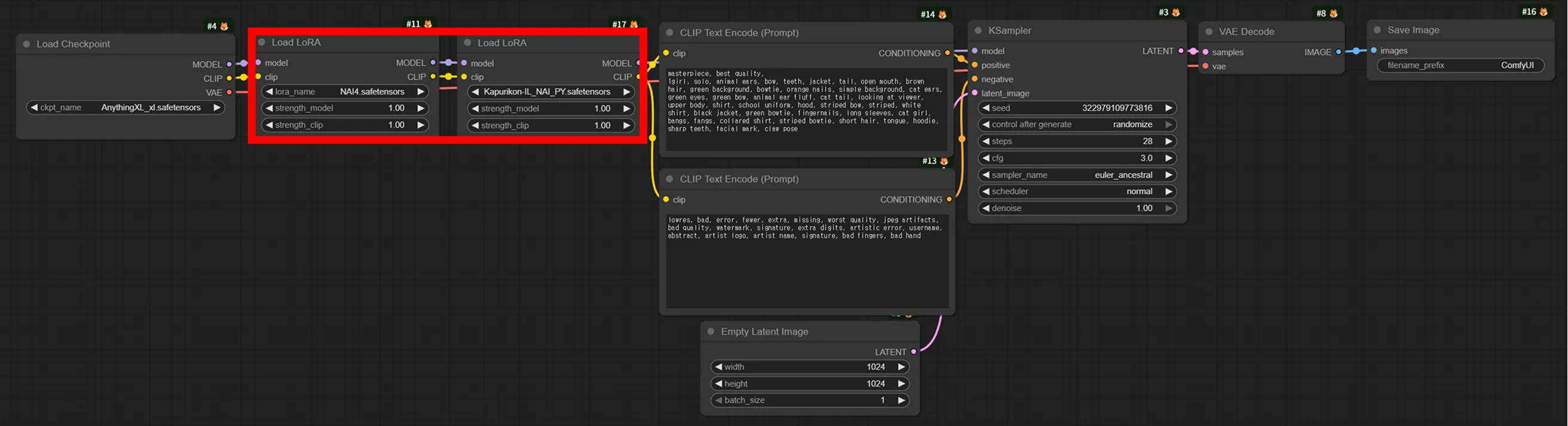
Applying Multiple LoRAs
Section titled “Applying Multiple LoRAs”To apply multiple LoRAs simultaneously, chain LoraLoader nodes in sequence:
Reference Workflow
Section titled “Reference Workflow”Flux.1 Dev USO Reference - Generation Based on Reference Images
Section titled “Flux.1 Dev USO Reference - Generation Based on Reference Images”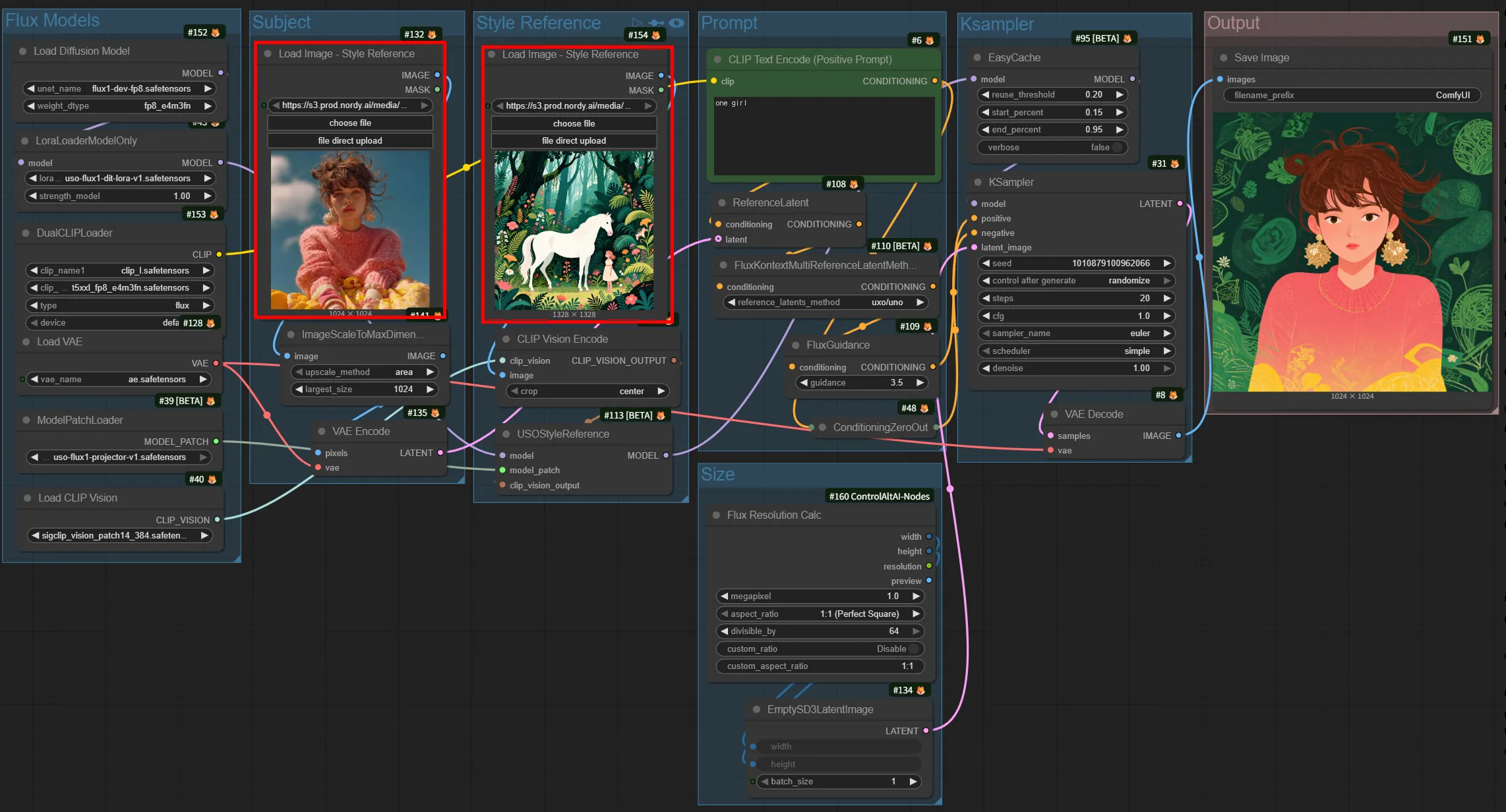
Generates new images while maintaining the style and subject consistency of the reference image.
Example use cases:
- Generate the same character in various poses/backgrounds
- Create a consistent series of product images
- Generate diverse variations of the same subject
Which Approach Should You Choose?
Section titled “Which Approach Should You Choose?”Recommendations by Purpose
Section titled “Recommendations by Purpose”- Need to maintain precise contours -> Canny ControlNet
- Want to preserve perspective/spatial arrangement -> Depth ControlNet
- Want to generate in a specific style/character -> LoRA
- Want to transfer the mood of a reference image -> Reference
- Need to maintain a specific pose -> OpenPose ControlNet
Summary
Section titled “Summary”| Topic Covered | Key Points |
|---|---|
| ControlNet | Controls spatial structure through structure maps (edges/depth/pose). Three architectures exist: dedicated models, ControlNet modules, and model patches |
| LoRA | Customizes style/character/concept through lightweight weight files. Can be chained via LoraLoader |
| Reference | Transfers style/mood from reference images. Better suited for mood transfer than structural control |